Skip to content

Protocol

Preview. Test. Three exercises. Results.

The same session structure every time: preview the signal, test your maximum, train mass, strength, and tone, then save the results chart.

Before you train

Preview

Place the sensor, check the battery, and confirm a live signal before the session starts.

  1. 1Apply electrode gel to the sensor contacts.
  2. 2Press the metal contacts to the perineum and hold. Strap the unit to the wrist.
  3. 3Watch Preview to confirm the graph moves when you contract.
  4. 4Tap Start Training when the signal is clean.
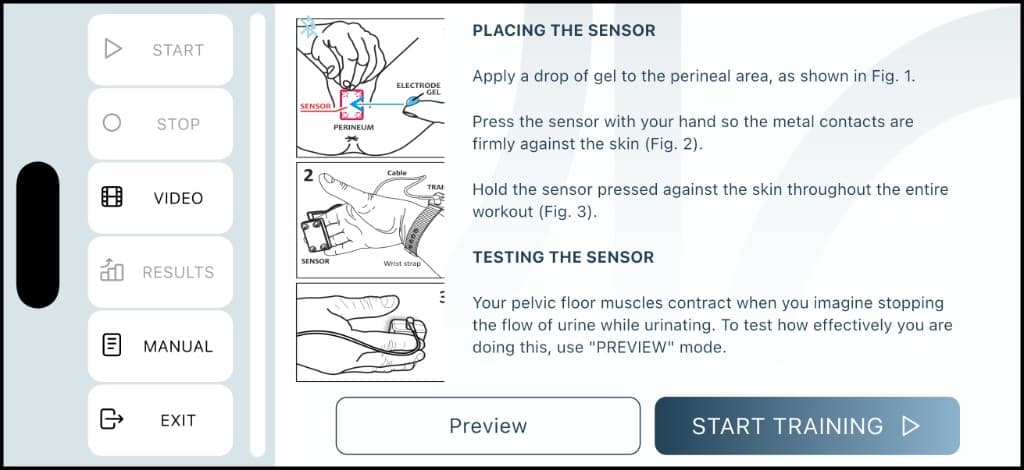
SX-TRAINER Preview — placing the sensor and Start Training

Before every session

Test

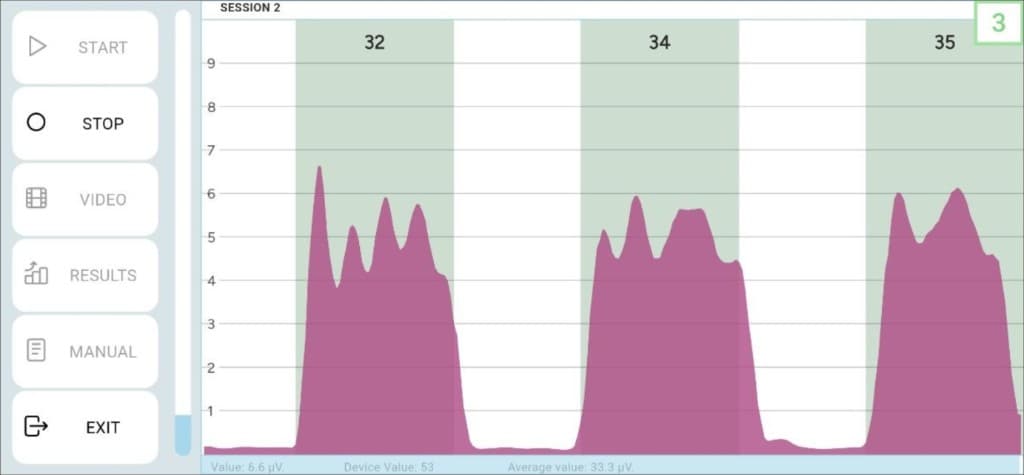
Three maximum contractions. The app reads peak scores, sets intensity, and stores the result as your session baseline.

  1. 1Follow voice prompts and squeeze with maximum effort three times.
  2. 2Each peak is scored in the green column above the graph.
  3. 3The average becomes the primary progress marker for the course.
  4. 4Intensity and the red-line threshold for Exercise 1 are set automatically.
SX-TRAINER Test — three maximum contractions

Exercise 1

Restoring Muscle Mass

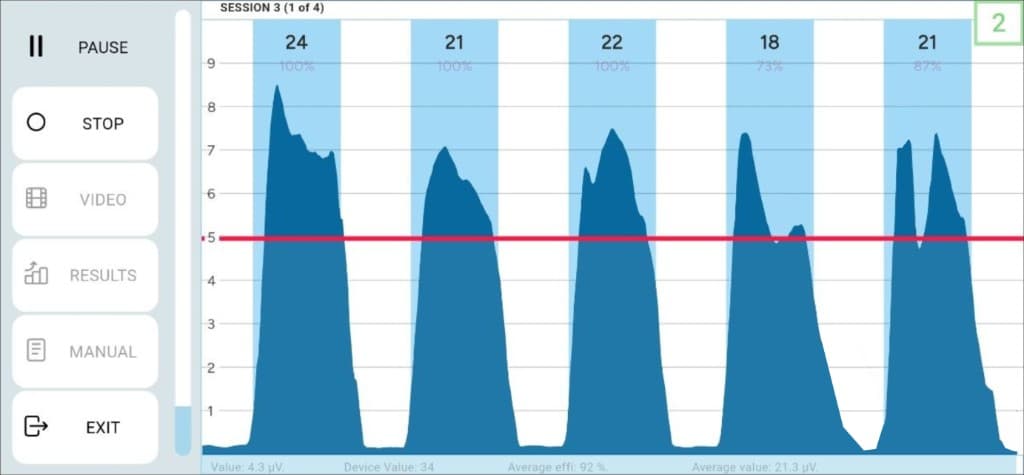
Five powerful contractions per cycle. Push the filled graph above the red line. Builds the foundation of pelvic floor strength.

  1. 1Press START and follow voice prompts through five contractions.
  2. 2Aim to lift each peak above the red threshold line.
  3. 3Efficiency % and µV are scored above every column.
  4. 4Repeat after a short rest. Keep the sensor firmly against the skin.
SX-TRAINER Exercise 1 — contractions above the red line

Exercise 2

Restoring Muscle Strength

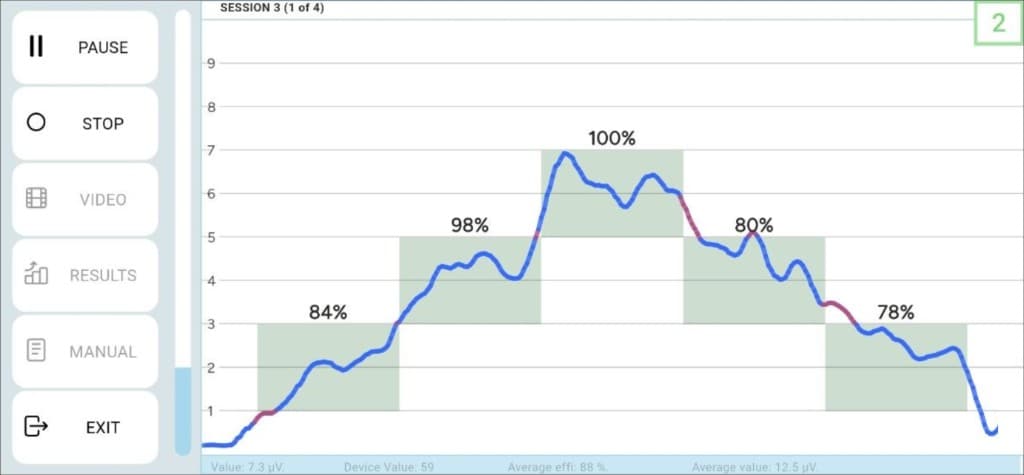
Guide the line through green target blocks. Leaving a zone counts as an error — trains fine control, not just force.

  1. 1Press START and watch the stepped green targets.
  2. 2Match tension so the line stays inside each block.
  3. 3Each zone reports an accuracy percentage.
  4. 4Focus on precision. Repeat after a rest period.
SX-TRAINER Exercise 2 — line through green target zones

Exercise 3

Restoring Muscle Tone

Hold the blue bar to keep your video playing. If tension drops, the picture stops. Trains endurance and steady control.

  1. 1Press START and keep a constant, steady contraction.
  2. 2The video plays only while the bar stays high enough.
  3. 3Cycles are marked 1/5. Open GRAPH anytime to see the trace.
  4. 4Pick a YouTube video with the VIDEO button in the sidebar.
SX-TRAINER Exercise 3 — video biofeedback

After the session

Results

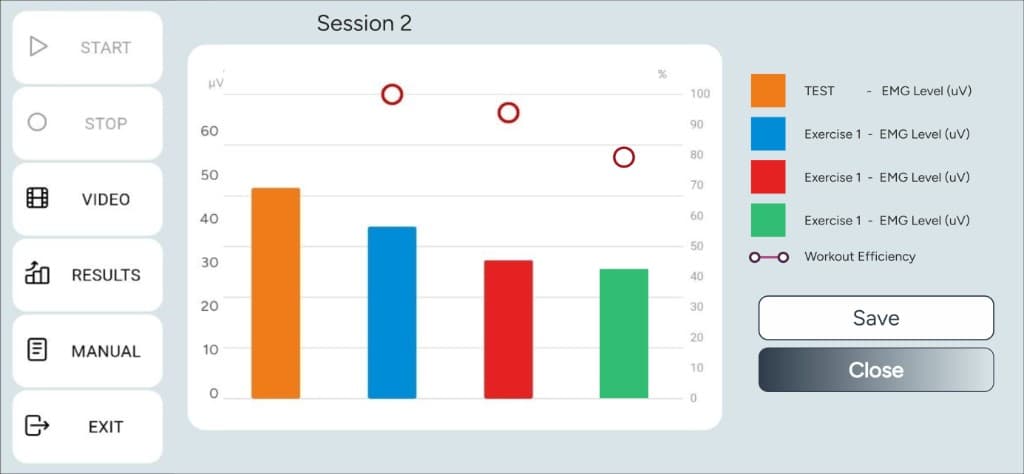
One chart for the visit: TEST and three exercises in µV, plus workout efficiency on the right axis. Save it, then close.

  1. 1Orange bar is the Test — your session baseline in microvolts.
  2. 2Blue, red, and green bars are Exercises 1, 2, and 3.
  3. 3Hollow circles mark workout efficiency for each exercise.
  4. 4Tap Save to keep the session, or Close to return to the sidebar.
SX-TRAINER Results — session bars and efficiency

Start training with real feedback

A pocket EMG sensor, a 28-session coach, and a graph that does not let you cheat.